

 Home
Home Features
 Testimonials
 Downloads
 FAQ
FAQ What is Kikaroo?
 Blog
Blog Chore charts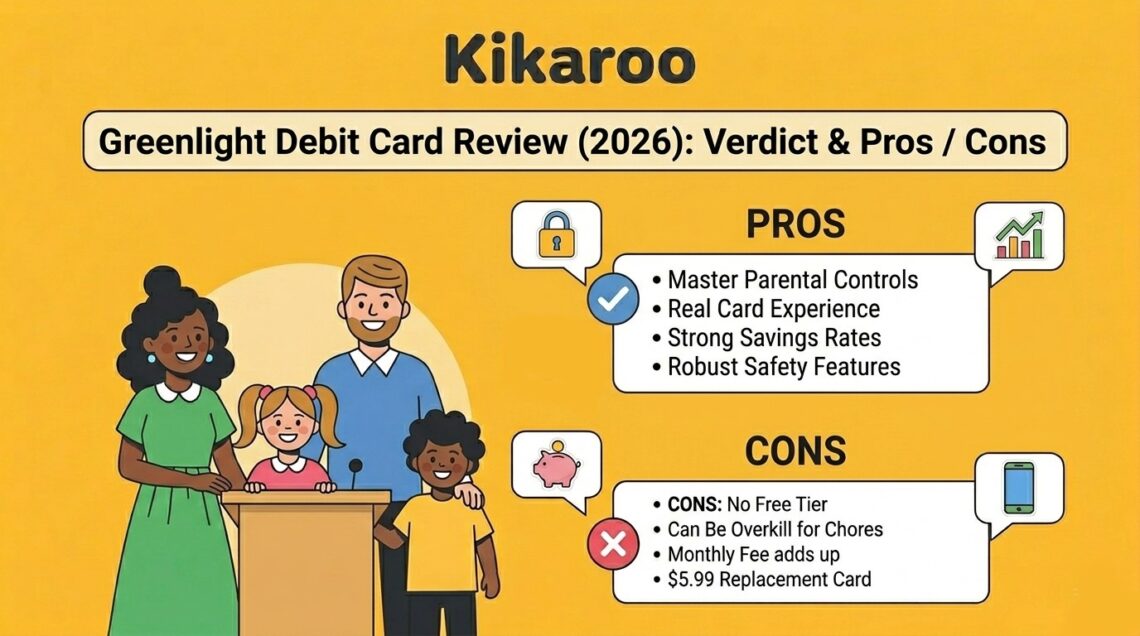
Verdict: Greenlight is a well-built family financial platform, a real debit card for kids with parental controls, plus chore tracking, savings, and investing layered on top. It’s worth the $71.88+/year price for families who want financial literacy with a real card. It’s overkill if all you actually want is a chore app, in which case a focused chore-and-reward app will cover that use case for free.
Rating: 4 / 5 – strong product, but the wrong fit for many families who land on it.
This review breaks down what the Greenlight debit card is and how it works, what each plan costs, who it’s actually for, what real users say, and how it stacks up against alternatives. We’re a chore-app team (we build Kikaroo), so we have a perspective the affiliate-driven financial sites don’t, including honesty about the families who’d be better off with something simpler.
Pros and Cons at a Glance
Pros
- Real Mastercard debit card with comprehensive parental controls
- Works for the whole family, up to 5 kids on a single account
- Strong financial education built in (savings, investing, Level Up game)
- Robust safety features on higher tiers (location sharing, crash detection)
- Compatible with Apple Pay and Google Pay
- Works internationally in 150+ countries with no foreign transaction fees
- 4.8★ App Store rating, 4.7★ Google Play (tens of thousands of reviews)
- Customer service is generally responsive on paid tiers
Cons
- No free tier, minimum $71.88/year, no trial period
- Four pricing tiers can feel like upsell pressure
- The debit card mechanic is overkill for kids under age 9
- Chore tracking is one feature in a broader banking platform
- Card replacement is $5.99 after the first free one per year
- Custom Card costs an extra $9.99 (one-time)
- No pause option, must close account entirely to stop billing
- Investing locked behind the Max plan ($131.76/year)
Greenlight Plans and Pricing
Greenlight has four pricing tiers as of May 2026:
| Plan | Monthly | Annual | What’s included |
|---|---|---|---|
| Core | $5.99 | $71.88 | Debit card, chores, allowance, 2% savings rate, financial literacy game |
| Max | $10.98 | $131.76 | Core + investing, 1% cash back, 3% savings, priority support, purchase protection |
| Infinity | $15.98 | $191.76 | Max + family location sharing, crash detection, 5% savings rate |
| Family Shield | $19.98 | $239.76 | Infinity + identity theft protection, credit monitoring, 6% savings rate |
All plans cover up to 5 children on a single family account. Family Shield can also include up to 2 older adults. Prices are plus applicable taxes, depending on your state.
Beyond the subscription, optional one-time fees include a $9.99 Custom Card, $5.99 replacement cards (after the first free one each year), and $24.99 expedited shipping. For the full fee breakdown, see our Greenlight Fees Explained guide.
Who Greenlight Is Actually For
Greenlight is a great fit if your family wants:
- A real debit card for kids, with detailed parental controls
- Financial literacy education tied to actual spending experience
- Savings goals with a real savings rate (2-6% depending on tier)
- Investing exposure for teens, with parental approval
- Family safety features like location sharing and crash detection (Infinity+)
Greenlight is probably the wrong fit if:
- Your main goal is chore tracking and reward motivation, not banking
- Your kids are under 9 and can’t use a debit card independently yet
- You don’t want to give children a physical card at all
- You prefer rewards beyond money (screen time, outings, privileges)
- You want to start free and pay only if it works for your family
The first bullet on the “wrong fit” list is the most common reason families end up looking for a Greenlight alternative. They wanted a chore app, downloaded Greenlight after seeing it advertised, and realized after a month that they were paying $5.99 to use one feature in a much bigger banking product.
Key Features in Detail
Debit Card with Parental Controls
Every child gets a physical Mastercard debit card. Parents fund the card from their own bank account, set spending limits by category (groceries, gas, online), block specific merchants, and get real-time alerts on every transaction. You can freeze the card from the app in seconds if it’s lost. This is genuinely one of the best implementations of parental card controls available.
Chore Tracking and Allowance
Parents assign chores with dollar amounts attached. Kids check off completed chores in the app, parents approve them, and the agreed allowance transfers automatically from the parent’s funding source to the child’s card. The chore mechanic works, but it’s tied to money. There’s no option for non-cash rewards.
Savings Goals
Kids can create savings goals (a new game, a bike, a concert ticket) and watch their balance grow toward the target. Greenlight pays a savings rate on stored funds: 2% on Core, scaling up to 6% on Family Shield. That’s competitive with savings accounts and unusually high for a kids’ product.
Investing for Kids and Teens (Max plan and above)
On the Max tier and higher, older kids can buy fractional shares of stocks and ETFs. Every trade requires parental approval. The investing feature is well-implemented for a starter platform. It won’t replace a real brokerage account, but it’s a reasonable way to introduce investing concepts.
Level Up Financial Literacy Game
A built-in mini-game that teaches money concepts through quizzes and progress tracking. Age-appropriate for kids roughly 9-14, and one of Greenlight’s more frequently praised features in user reviews.
Family Safety Features (Infinity plan and above)
Family location sharing, crash detection, and SOS alerts on the Infinity tier. Identity theft protection and credit monitoring on Family Shield. These are real safety features, not gimmicks, particularly useful for families with teen drivers.
How It Works: Getting Started
Setting up Greenlight takes roughly 15-20 minutes from download to first card use:
- Parent downloads the app and signs up. Greenlight verifies your identity (Social Security number, address, date of birth) because it’s a financial product subject to KYC requirements.
- Fund your parent account from a linked bank account or debit card.
- Add each child. Provide their name, date of birth, and address. Greenlight issues a separate card per child.
- Cards ship in 7-10 business days with free standard shipping (or pay $24.99 to expedite).
- Set up parental controls, allowance schedule, chores, and savings goals while waiting for cards to arrive.
- Cards arrive and get activated in the app, kids can start using them immediately.
The KYC step is the friction point. Greenlight is a financial company (technically Community Federal Savings Bank handles the banking, with Greenlight as the tech partner), so identity verification is required. Setup is slower than a pure-software chore app, but not unreasonable for a debit card product.
Is Greenlight Safe to Use?
This is one of the most common questions, and the answer is mostly yes, with caveats.
Greenlight is FDIC-insured through Community Federal Savings Bank (up to $250,000 per depositor). Funds on the card are protected the same way they would be at a regular bank. Greenlight uses standard banking-grade encryption, and the app supports biometric login.
Parental controls are strong. You can set per-merchant spending caps, block categories, get real-time alerts on every transaction, and freeze the card instantly from the app. If your child’s card is compromised, you can shut it down faster than you could with most adult debit cards.
The caveats: some Trustpilot reviews complain about difficulty closing accounts and getting funds returned. Customer service response times on the lower tier (Core) can be slow. These are real complaints, not deal-breakers, but worth knowing before you sign up.
Greenlight is owned by Morgan Stanley as of 2024, which is a positive signal for stability, but may be relevant context for families who care about who’s holding their data.
What Real Users Say
Greenlight rates 4.8★ on the App Store and 4.7★ on Google Play across tens of thousands of reviews. Trustpilot ratings are mixed, with a higher proportion of negative reviews, but Trustpilot users skew toward people who came specifically to complain, which is normal for any consumer financial product.
Common praise points across review platforms:
- Real-time spending alerts work well and feel reassuring
- Parental controls are genuinely powerful
- Kids enjoy the visual savings goals and “earning” their own money
- Customer support is responsive on Max+ tiers
- The card mechanic teaches money concepts in a way pure apps can’t
Common complaints across review platforms:
- Subscription cost feels high, especially for families using only chores
- No free tier means you commit to paying before knowing if your kids will engage
- Account closure can be slow, users report waiting weeks for fund returns
- Customer service on the Core tier sometimes takes days to respond
- Investing is locked to Max+, which feels like an upsell
The pattern is consistent: people who use Greenlight’s full feature set are largely happy. People who came for one feature (usually chores) feel they’re paying for a lot they don’t use.
Greenlight vs Alternatives
Greenlight isn’t the only option in this space. Here’s how it compares to other family-focused apps:
| Greenlight | BusyKid | Kikaroo | |
|---|---|---|---|
| Type | Debit card + banking + chores | Debit card + chores | Chore + rewards app |
| Free tier | No | No | Yes |
| Monthly cost | $5.99-$19.98 | $4 | Free / $2.99 premium |
| Debit card | Yes, required | Yes, included | None |
| Age range | 5-17 | 5-17 | 4-18 |
| Reward type | Money only | Money only | Custom (money, screen time, outings, anything) |
| Setup time | 15-20 min | 10-15 min | 5 min |
| Free trial | None | None | N/A (free tier instead) |
| Best for | Financial literacy w/ real card | Banking-lite + allowance | Chore tracking + motivation |
BusyKid is the most direct Greenlight competitor, also a kids’ debit card with chores, at about half the price. It’s a reasonable alternative if you want the card mechanic without paying Greenlight’s premium pricing, but with fewer features.
Joon takes a different approach entirely, gamified chores with a virtual pet, no debit card, designed for ages 6-12. Good fit if your kids respond to game mechanics over real-world rewards.
Kikaroo focuses purely on the chore-and-reward use case. Free tier covers it without a card, works from age 4, lets you set any reward type. The right tool if you specifically want chore motivation without banking.
Forbes, Bankrate, and PCMag all compare Greenlight to other debit card products (BusyKid, Chase First Banking, Capital One MONEY), but none of them compare it to chore-only apps, because that’s a different product category. If banking isn’t your goal, the comparison set is different.
Is Greenlight Right for Your Family?
Choose Greenlight if:
- You want a real debit card for kids, and you’ll actually use it
- Financial literacy with hands-on money management is your goal
- Your kids are 9 or older and ready to handle a card independently
- You want savings + investing + safety features in one place
- $71.88+/year is reasonable for what you’re getting
Choose a chore-only app instead if:
- Your main goal is chore tracking and reward motivation
- Your kids are under 9 and won’t use a card meaningfully yet
- You prefer non-cash rewards (screen time, outings, privileges)
- You want to start free and only pay if the system works for your family
- You don’t want to give your children a physical debit card at all
The decision usually comes down to scope: Greenlight is a banking platform with a chore feature. If you want banking, it’s competitive. If you want chores, simpler is better.
Why You Should Trust This Review
We’re the team behind Kikaroo, a chore app for families. That gives us two things most reviewers don’t have:
- No Greenlight affiliate relationship. We don’t earn anything when you sign up for Greenlight, so we have no reason to soften its weaknesses to keep affiliate commissions flowing. Forbes, Bankrate, and most “best kids debit card” lists are affiliate-driven. Their incentives reward conversions, not honesty.
- Direct experience with the chore-app use case. We talk to hundreds of families who tried Greenlight (or considered it), then moved to a focused chore app because the banking layer wasn’t what they needed. We see this pattern often enough to write honestly about who Greenlight is and isn’t for.
We’ve verified Greenlight’s pricing and feature details against the official plans page and support documentation as of May 2026. Pricing changes periodically, always check greenlight.com/plans for current rates before signing up.
Frequently Asked Questions
Is Greenlight a good debit card?
For families who want financial literacy with a real card, yes, Greenlight is one of the best-built products in this category. Parental controls are strong, the app is well-rated (4.8★ App Store), and the feature set is comprehensive. For families who only need chore tracking, it’s overkill.
How safe is the Greenlight debit card?
Funds are FDIC-insured up to $250,000 through Community Federal Savings Bank. The app uses banking-grade encryption and supports biometric login. Parental controls let you freeze the card instantly, set spending limits, and get real-time alerts on every transaction. Greenlight is owned by Morgan Stanley as of 2024.
Does it cost $20 a month?
Only at the highest tier. Family Shield is $19.98/month (about $20 rounded up). The entry plan, Core, is $5.99/month. Most families using Greenlight for chores and basic savings are on Core.
What places don’t accept Greenlight?
Greenlight works almost anywhere Mastercard is accepted, but has built-in restrictions for safety: blocked merchant categories include gambling, adult content, and certain age-restricted purchases. Some online merchants that require credit cards (rather than debit) won’t accept it.
Is Greenlight free?
No, Greenlight has no free tier on its own. Minimum cost is $71.88/year on the Core plan. The only way to use Greenlight at no cost is through a partner bank like DCU or North Shore Bank that offers it free to their members.
Can I cancel Greenlight any time?
Yes, Greenlight is a monthly subscription with no contract. However, there’s no pause option, to stop the monthly fee you have to close your account entirely. Some users report that closing accounts and getting funds returned can take longer than expected.
Is there a Greenlight alternative for chore tracking only?
Yes. Kikaroo is a free chore-and-reward app for families with kids aged 4 to 18, no debit card required, custom rewards. For a side-by-side comparison, see our Kikaroo vs Greenlight guide.
Does Greenlight work with Apple Pay and Google Pay?
Yes. Once a child’s card is activated, they can add it to Apple Pay or Google Pay subject to those platforms’ age requirements.